← Back to Studio Catalog
CastDoodle app icon
01 — iPad · iPhone · Android · 100% Offline

CastDoodle

Party Drawing & TV Guessing Game

Draw at full speed on your tablet or phone while everyone in the living room watches the live canvas, countdown clock, and scoreboard on your TV. Your secret word never appears on the television or leaves your local network.

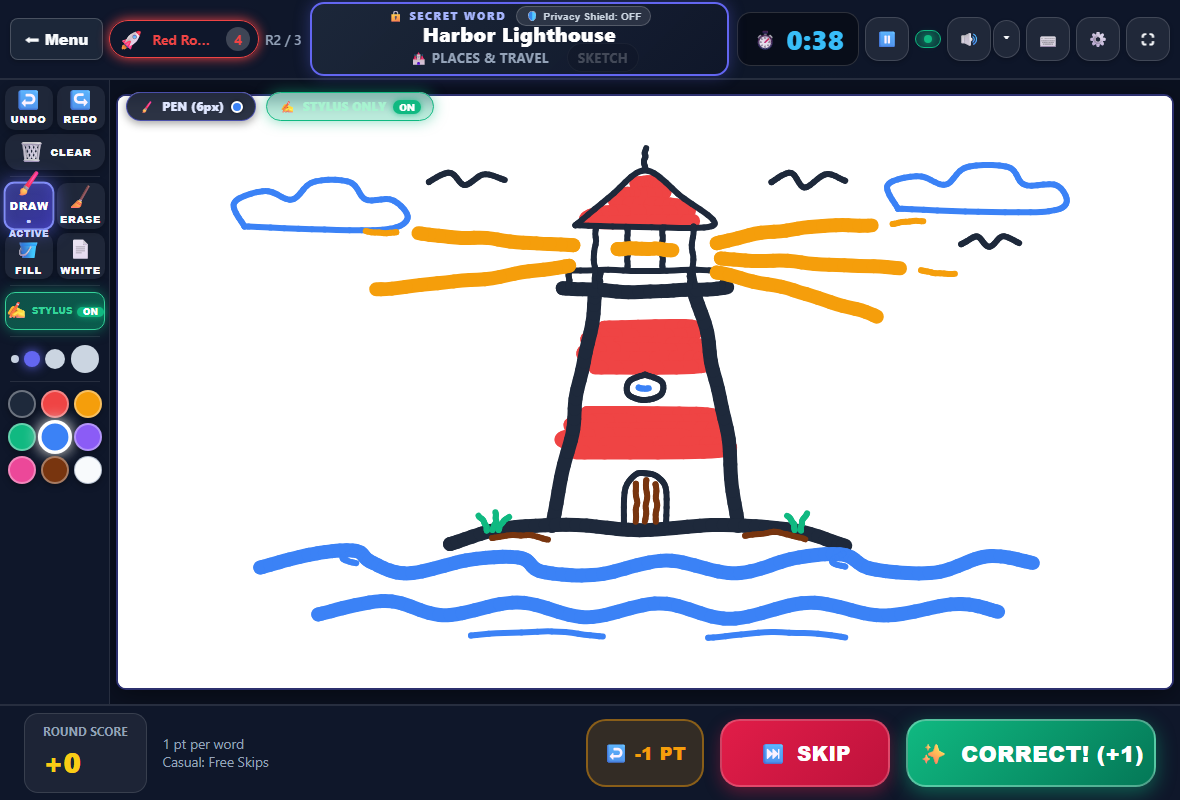
FIG 01.A — Drawer’s Tablet Secret Word Private
CastDoodle tablet drawer interface showing secret word Harbor Lighthouse, color swatches, stylus tools, and live canvas
Only the active drawer sees the secret word (Harbor Lighthouse), brush controls, palm rejection toggle, Skip, and Correct (+1) controls.
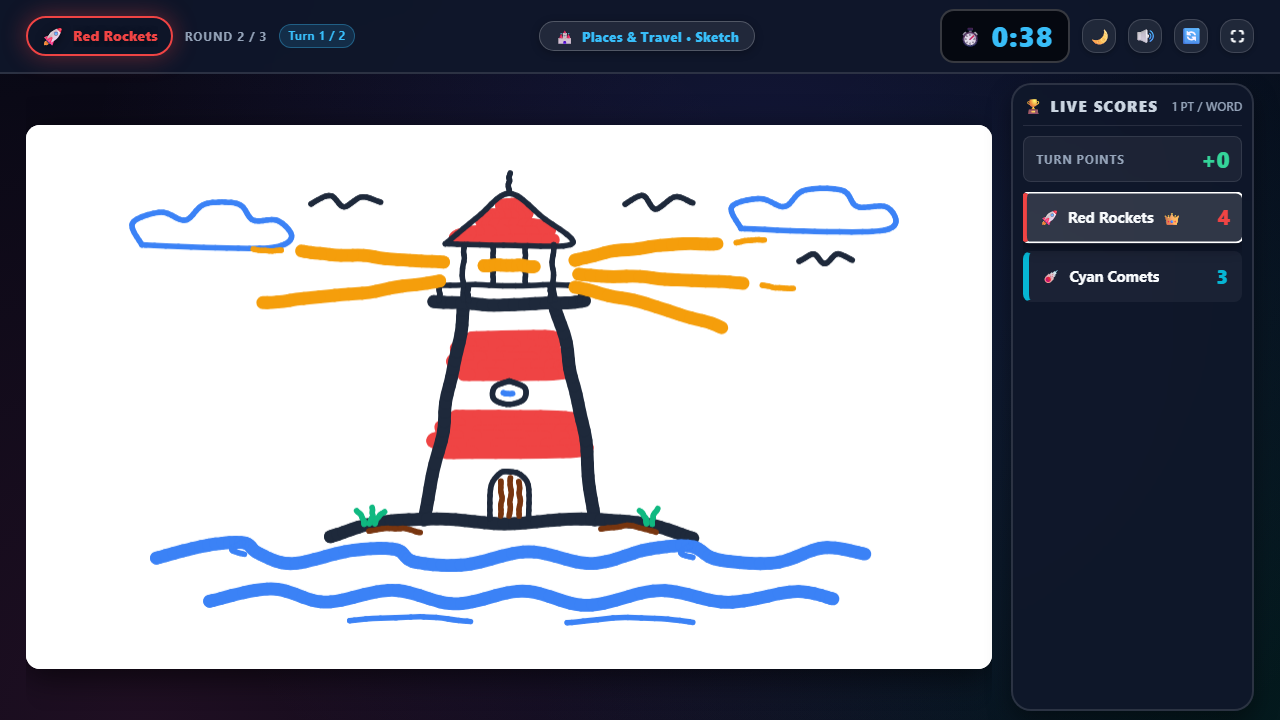
FIG 01.B — Living-Room TV Word Hidden
CastDoodle TV spectator screen mirroring the live lighthouse strokes alongside team scores, round counter, timer, and safe category clue
Guessers on the couch see only the live strokes, countdown timer, safe category badge (Places & Travel · Sketch), and live team scoreboard.
Capabilities

Built for Living-Room Play

Zero Accounts · Zero Lag
01 / Dual-Screen Casting

AirPlay, Smart View & HDMI

Automatically projects the TV Spectator display over Apple AirPlay, Android Smart View, Wireless Display, extended desktop modes, or a direct USB-C / Lightning HDMI cable. Optional Hold to Peek Privacy Shield protects full-screen mirroring setups.

02 / Precision Input

Apple Pencil & Stylus Palm Rejection

Enable “Stylus Only” mode to rest your hand directly on the glass without stray marks. Pressure sensitivity and smooth curve interpolation render razor-sharp strokes up to 4K TV resolutions.

03 / Offline Word Bank

10,000+ Curated Prompts

Eight family-friendly categories across Doodle, Sketch, and Masterpiece difficulty tiers, using stratified no-repeat sampling so large categories never crowd out smaller ones — plus local custom word lists.

04 / Flexible Formats

Team, Free-For-All & Solo

Play with 2 to 8 customizable teams, switch to individual Free-For-All scoring, or run Solo / Co-op turns. Pick Casual (unlimited skips) or Competitive (time penalty skips) with custom 10s–600s round clocks.

05 / Zero Connectivity Required

100% Offline Audio & State

Synthesized sound cues (correct chimes, countdown ticks, turn buzzers, and victory fanfare) and the entire word bank run offline right on your device.

06 / Fair Monetization

Family-Friendly & One-Time Upgrade

Free editions display G/PG non-personalized banner ads strictly between rounds. An optional one-time “Remove Ads” purchase removes them permanently — no subscriptions.

Releases

Store Availability

Google Play & Apple App Store
Android · Coming Soon

Google Play Store

Built for Android tablets (including Samsung Galaxy Tab S-Pen, Pixel Tablet, and Lenovo Tab) and phones with Smart View, Wireless Display, and USB-C HDMI support.

iPadOS & iOS · Coming Soon

Apple App Store

Optimized for iPad (Apple Pencil palm rejection & extended display) and iPhone with Apple AirPlay and Lightning / USB-C Digital AV HDMI adapters.

Help Center

Frequently Asked Questions

TV Setup & Billing
How do I connect CastDoodle to my TV via Apple AirPlay (iPad & iPhone)?
  1. Connect your iPad or iPhone and your Apple TV (or AirPlay 2 Smart TV) to the same Wi-Fi network.
  2. Swipe down from the top-right corner to open Control Center.
  3. Tap Screen Mirroring and choose your Apple TV or AirPlay 2 TV.
  4. Inside the native CastDoodle app (or iPad Extended Display), the TV automatically shows only the TV Spectator screen while the secret word remains private on your handheld screen.

Using full-screen mirroring? If your TV mirrors your exact device screen instead of extending it, turn on Secret Word Privacy Shield (Hold to Peek) inside CastDoodle.

How do I connect via Smart View, Wireless Display, or DeX (Android)?
  1. Swipe down from the top of your Android tablet or phone to open Quick Settings.
  2. Tap Smart View, Screen Cast, or Wireless Display (or launch Samsung DeX / Wireless Extended Display) and select your TV.
  3. When projecting as a secondary/extended display, CastDoodle automatically sends the private TV Spectator view to the TV while keeping the secret word on your tablet.

Tip: If your TV mirrors your exact screen, enable Secret Word Privacy Shield inside CastDoodle so guessers cannot see the prompt.

Can I connect to my TV using an HDMI cable?

Yes. Connect a USB-C to HDMI cable or adapter (Android devices and USB-C iPads) or an Apple Lightning / USB-C Digital AV Adapter (iPhone and iPad). CastDoodle detects the external display automatically and runs zero-lag dual-screen spectator mode completely offline.

How do I restore my one-time “Remove Ads” purchase?
  1. Confirm your device is signed into the same Apple ID (App Store) or Google account (Google Play) used for the original purchase.
  2. Open CastDoodle and go to Settings.
  3. Tap Restore Purchases. Apple StoreKit or Google Play Billing verifies your one-time purchase and removes ads immediately at no extra cost.

If you still need assistance, email support@postrockstudios.com with your device model and store platform (never include payment card numbers).

Does CastDoodle require Wi-Fi, an account, or a subscription?

No. All 10,000+ words, drawing tools, timers, and synthesized audio effects work offline on your device. There are no user accounts, and “Remove Ads” is a single optional one-time purchase.

Are my drawings or custom word lists ever uploaded to a server?

Never. Drawings, custom words, scores, and preferences remain strictly on your device. Local TV casting stays between your device and your television. Read full details in the CastDoodle Privacy Policy.

Direct App Support

Need Help With CastDoodle?

Email support@postrockstudios.com. Sharing your device model (e.g., iPad Air, Galaxy Tab S9), OS version, and TV connection method helps us diagnose issues quickly.